Shopping Cart
(0)Free UK delivery on orders over £37.99
Sorry, we don't ship to yet. If you'd like to order anyway, email us at info@bangeofficialstore.com
Most "laptop backpacks" quietly max out at 15.6 inches. The product photo shows a laptop, the title says "laptop backpack," and the spec sheet, if you scroll far enough, admits your 17″ machine won't zip in.
If you carry a 17″ or 17.3″ laptop, the sleeve either fits or it doesn't; there's no squeezing an extra inch of aluminum. This guide covers what actually determines fit, then lists five BANGE packs whose 17″ capacity we verified against each product's own specifications, not the marketing headline. One popular travel pack didn't make the cut for exactly that reason. For the full picture on choosing any laptop backpack size, not just 17-inch, see our complete buying guide.
Our picks at a glance
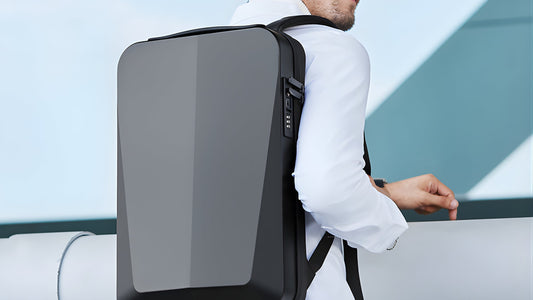
🏆 Best overall: BANGE Aerox 2517: TSA 180° flat-open 17″ sleeve, $74.99
🦢 Lightest: BANGE Orbix 2913: 0.88 kg, fits up to 17.6″
🧳 Biggest: BANGE Belen 8079: 50L with shoe compartment
⛰️ Best outdoor: KAKA 2070: 40L, 1680D shell, $74.99
✅ The diagonal is marketing; the footprint is physics. "17 inch" measures the screen corner-to-corner, but the sleeve has to swallow the whole chassis: typically around 40 × 27 cm for a 17.3″ laptop, plus bezels and rubber feet. A bag rated 15.6″ is usually 3-4 cm too short in exactly the direction that doesn't flex.
✅ Sleeve depth beats bag height. Plenty of tall 45L bags still have a 15.6″ sleeve, because the padded pocket is sewn smaller than the compartment around it. Always check the stated laptop fit, not the bag's overall dimensions: a compact 22L can out-fit a 45L here.
✅ Padded vs suspended sleeves. A padded sleeve wraps foam around the laptop. A suspended (or shock-absorbing) sleeve also lifts it a few centimeters off the bag's floor, so when you set the bag down hard, the frame, not your laptop's corner, takes the hit. Heavier 17″ machines benefit most; the Aerox and Strava-class BANGE sleeves are shock-absorbing for this reason.
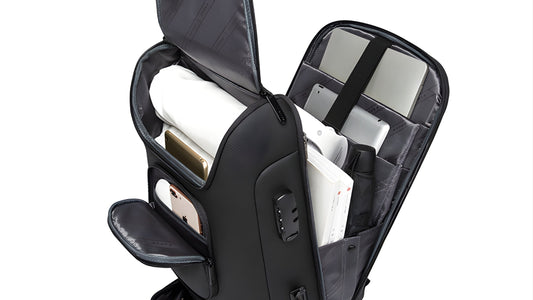
✅ A 180° opening earns its keep at this size. Wrestling a 17″ laptop out of a top-loading slot in an airport line is miserable. Bags that unzip flat, like the Aerox's TSA 180° sleeve, let the laptop lie in its own layer and slide out without unpacking.
❌ "Fits 17″" with no sleeve. Some listings mean "a 17″ laptop fits somewhere in the main compartment, unprotected." Every bag below states a dedicated 17″-class laptop space in its own specifications. We dropped the BANGE Skyla 1909 from this list because its product data doesn't state a laptop fit at all: great travel pack, unverified for this job.
The section above covers why "17 inch" is such a loose label. Here's what to actually do with that: how to measure your own machine, what a "TSA-friendly" laptop sleeve is really certifying, and why the straps matter more once your laptop crosses into 17-inch territory.
✅ Close the laptop and measure the whole thing, not the screen. Put it on a flat surface and run a tape measure or ruler across the width (left to right), the depth (front to back), and the thickness, with the lid shut. That closed footprint, not the diagonal screen size on the box, is what has to slide into a sleeve.
✅ Include the extras. Rubber feet, a raised hinge, and any case or sleeve you already use around the laptop all add to that footprint. If you carry your laptop in a slim shell case day to day, measure it with the case on, since that's the size the backpack's sleeve actually has to swallow.
✅ Or skip the tape measure and check the manufacturer's spec page. Laptop makers publish exact chassis dimensions, usually listed as width x depth x height in millimeters, on the same page as the screen size. That number is more reliable than eyeballing it.
✅ Gaming and business 17″ laptops aren't the same size. A 17-inch gaming laptop from a brand like Alienware, ASUS ROG, or MSI packs a discrete graphics card and extra cooling into the chassis, so it commonly runs thicker, and sometimes wider, than a 17-inch business laptop such as a ThinkPad or Latitude, even when both list an identical screen diagonal. Apple doesn't make a 17-inch MacBook at all, so "17 inch" almost always means a Windows machine, and it's worth checking your specific model's depth against the sleeve's stated depth rather than assuming all 17-inch laptops are interchangeable.
A bag that unzips flat, like the Aerox's 180° sleeve, is usually marketed as checkpoint-friendly or TSA-friendly. That's not an official TSA certification: TSA doesn't test or approve specific bags. It's a self-declared design standard that most bag makers build to, which generally means the laptop compartment has to open completely flat with nothing else in it, no snaps, zippers, or buckles overlapping that section, so a security agent gets a clean, unobstructed view of the laptop on the X-ray image without needing you to pull it out. Even with a compliant bag, an agent can still ask you to remove the laptop if the image isn't clear enough, so treat the 180° opening as something that makes checkpoints faster and less fumbly, not a guarantee you'll never be asked to take the laptop out.
A 17-inch laptop is usually heavier than a 13 or 14-inch ultrabook, sometimes considerably so if it's a gaming or workstation model with a bigger battery and cooling system built in. That weight sits high on your back, near your shoulder blades, and how well it carries comes down to the strap system more than the laptop itself. Wide, padded, contoured shoulder straps spread that load across more surface area than thin straps do. A sternum strap, the horizontal strap that clips across your chest, keeps the shoulder straps from sliding outward once there's real weight in the bag, which matters more at 17 inches than it does with a light 13-inch setup. If the bag includes a waist or hip strap, using it shifts some of that weight off your shoulders and onto your hips instead, which is worth doing on longer walks or commutes with a fully loaded 17-inch pack.

20-35L · 1.35 kg · Up to 17″, shock-absorbing sleeve · Coated Oxford + YKK zippers · USB port
The laptop section unzips 180° flat, TSA-checkpoint style, so your 17″ machine slides out without unpacking a thing. The sleeve is shock-absorbing, the 20-35L capacity flexes from office day to 4-5-outfit trip, and the Air Bag Belt back system keeps 17″-class weight off your shoulders.

0.88 kg · 46 × 30.5 × 18 cm · Up to 17.6″, shock-absorbable sleeve · Waterproof anti-scratch polyester
The roomiest sleeve on this list, rated to 17.6″, so even oversized gaming chassis fit, in the lightest bag here at 0.88 kg. Independent shock-absorbable laptop sleeve, dedicated tablet pocket, ventilated groove back panel and a luggage pass-through strap for airport days.

3-in-1 carry · Padded 17″ laptop + 9.7″ iPad compartments · Waterproof Oxford · Zinc-alloy anti-theft lock
Backpack, duffle or shoulder bag: with a padded compartment that takes a 17″ laptop in all three modes, plus a detachable sling and a separate shoe section. The zinc-alloy lock and anti-theft zippers guard the main compartment when the bag rides a luggage rack.

50L · 2.85 kg · Up to 17″ laptop · Water-resistant fabric · Dedicated shoe compartment
For trips where the 17″ laptop is only the beginning: 50 liters swallows several days of clothing, the shoe compartment keeps sneakers off your shirts, and the ergonomic carry system is built for the weight this bag will inevitably hold. It's a travel pack that happens to take your biggest machine.

40L (also 50L) · 1.65-1.94 kg · Up to 17″ laptop · 1680D Oxford polyester · Coded lock · 3 carry modes
Rugged 1680D Oxford with a fully waterproof exterior, a built-in coded lock, and three carry modes: shoulder, crossbody, hand. The multi-compartment interior takes a 17″ laptop, which makes it the rare hiking-grade pack that also works for a work trip. Black, Green or Camouflage.
| Backpack | Laptop fit | Capacity | Weight | Best for | Price |
|---|---|---|---|---|---|
| Aerox 2517 | Up to 17″ | 20-35L | 1.35 kg | Business travel | $74.99 |
| Orbix 2913 | Up to 17.6″ | N/A | 0.88 kg | Daily commute | $69.99 |
| Cryova 1810 | 17″ + 9.7″ iPad | N/A | N/A | 3-in-1 versatility | $74.99 |
| Belen 8079 | Up to 17″ | 50L | 2.85 kg | Long trips | $104.99 |
| KAKA 2070 | Up to 17″ | 40-50L | 1.65-1.94 kg | Outdoor + travel | $74.99 |
Flying often? The Aerox 2517 and its TSA 180° sleeve is the obvious pick. Carrying a huge 17.3″+ gaming laptop? The Orbix's 17.6″ rating gives you real margin, and saves your back at 0.88 kg. Packing for a week? Belen's 50L. Splitting time between trail and terminal? KAKA 2070. Want one bag that shape-shifts? Cryova.
And before you order any 17″ bag, anywhere: measure your laptop's width and depth, and compare against the stated fit: not the bag's outer dimensions.
Usually, but not always: 17″-class sleeves are generally cut for 17.3″ consumer chassis, while thick gaming laptops can be tight. If your machine is oversized, pick the Orbix 2913, which is explicitly rated to 17.6″, and compare your laptop's width and depth against the sleeve before committing.
A padded sleeve cushions the sides; a suspended or shock-absorbing sleeve also lifts the laptop off the bottom of the bag, so setting the bag down hard doesn't transmit the impact into the laptop's corner. For heavy 17″ machines, suspension matters more.
The commuter-sized picks (Aerox at 31 × 16 × 48 cm, Orbix at 46 × 30.5 × 18 cm) fit standard cabin limits. The 50L Belen and the KAKA in 50L trim are bigger than many budget-airline allowances: check your carrier before flying with them fully packed.
Yes, a 15.6″ or 14″ laptop simply sits lower in the sleeve. If the fit feels loose, use the tablet pocket for extra stability or add a slim laptop sleeve inside.
Because its published specifications don't state a laptop fit, and we only list bags whose 17″ capacity is confirmed by their own product data. It remains an excellent 35-45L travel pack, just unverified for 17″ laptop duty.
Every BANGE bag: free shipping over $49.99 · 1-year warranty
Shop Laptop Backpacks →Ada is an AI assistant. For anything urgent, email info@bangeofficialstore.com